Capping station & wiper blade: functions and maintenance
Updated: Jan 28
Capping station:
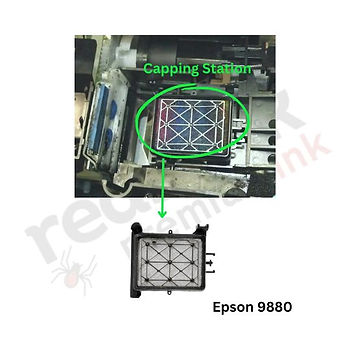
As the printhead returns, a square cap called the capping station rises to support it and forms a semi-airtight seal around the nozzles, keeping the ink from drying. During the cleaning function, a pump and sensor in the capping station help move and prime the ink inside the printhead.
How to maintain and clean it:
Apply 2–3 ml of head moisturiser to the pad and leave for 20 minutes.
Gently dab with a folded lint-free cloth to remove excess liquid and ink. Do not press too hard—some moisturiser left is fine.
Wiper blade:

Wiper Blade Maintenance: The wiper blade cleans the printhead, removing excess ink and debris to prevent clogs.
To maintain: Gently wipe the blade with a cotton swab or lint-free cloth dampened with cleaning liquid or distilled water. Alternatively, remove the blade, wash it in cleaning liquid or water, dry it, and reinstall.


